# Emails in code: see them, migrate them, improve them
Canonical: https://brew.new/blog/emails-in-code-visibility-migration-mcp
Author: Thomas Park
Published: 2026-10-12
Updated: 2026-10-12
Emails in code are product emails defined in your codebase and shipped like any other feature. On a team built on Resend and React Email, ask which emails the product sends and you get a pause. The welcome email is a component in `emails/`. Password reset lives in the auth provider's dashboard. The trial-ending email is a string in a cron job. Stripe sends the receipt. Nobody remembers what sends the "we miss you" email.
Each email was easy to ship, so nobody owns the full picture. We'd fix that in order: visibility, then migration, then improvement. The coding agent you already use can do most of it, connected to Brew over MCP.
## Key takeaways
- Start with an inventory, not a new tool: every email, its trigger, its file and its variables.
- A coding agent can find the send calls, render each template and import it with the `import_email` MCP tool. Import is deterministic, uses no AI and is free.
- Imported emails land on one canvas per group, so the team reviews them side by side on desktop and mobile.
- To migrate, a Resend-style send becomes a trigger plus a published automation, fired with one REST call. Production code uses REST, not MCP.
- Move one email type at a time behind a flag, and move transactional email last.
## Why code-defined email becomes invisible
React Email and Resend made email far better for developers: typed components, reviewed in pull requests. The cost shows up later.
**The emails are scattered.** Components, inline HTML in a background job, templates in a third-party dashboard, emails another service sends for you. No file lists them all.
**Previews are not production.** The React Email preview server shows one template with its preview props, not what a customer got, and nothing for other templates.
**Only engineers can look.** Product, design and support would have to ask an engineer to run the project, so mostly they don't.
**Nothing gets reviewed after launch.** The two-year-old email still has the old logo and a plan you no longer sell. Nobody notices because nobody sees them together.
## Step 1: Visibility
The goal is one shared view of every email. Nothing here touches production.
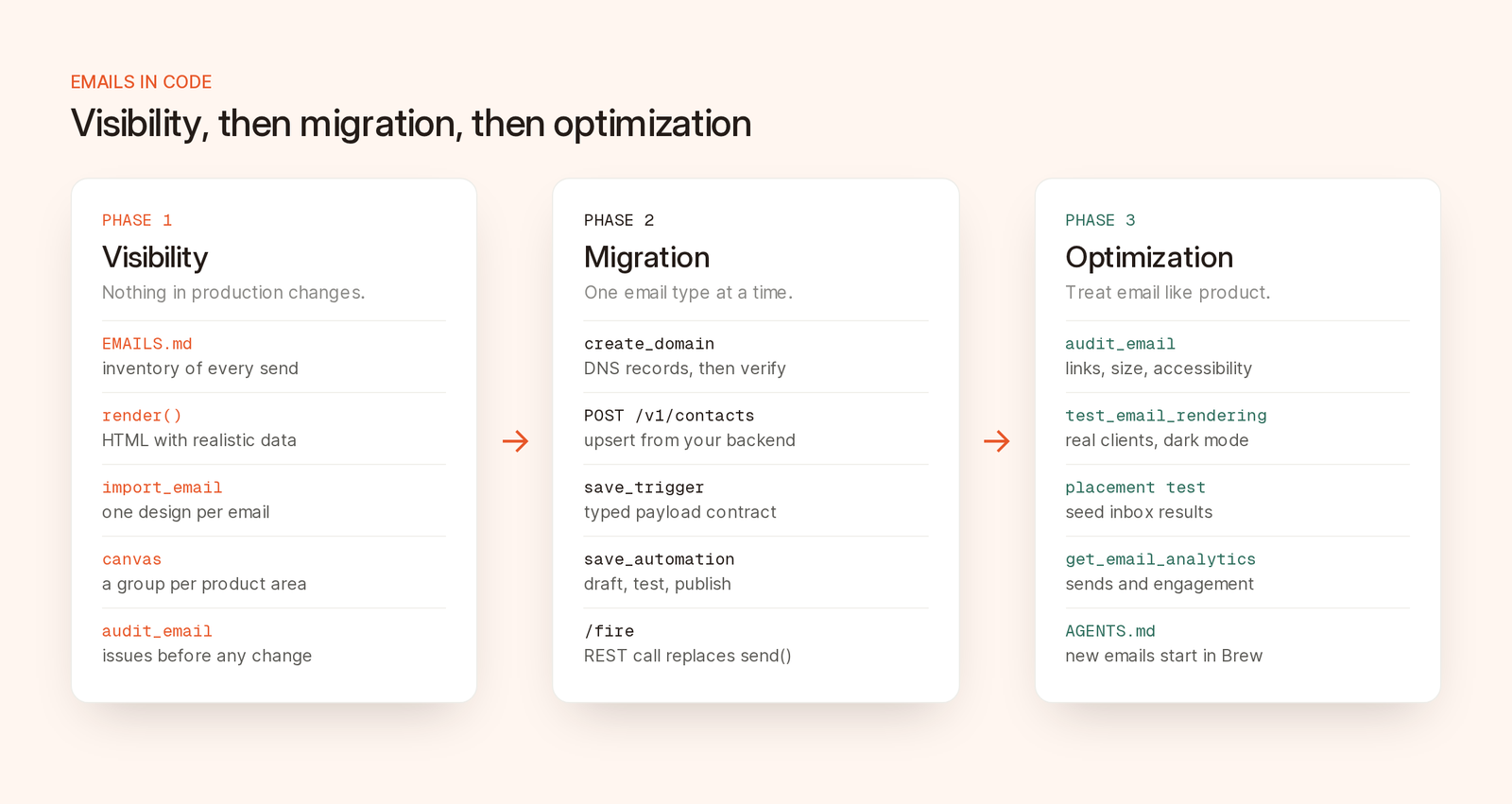
*Each phase is useful on its own, and you can stop after any of them.*
### Connect your coding agent to Brew
Brew's MCP server is at `https://brew.new/api/mcp` and uses OAuth: you sign in with Brew and choose the brand the agent can work in. In Claude Code:
```bash
claude mcp add --transport http brew "https://brew.new/api/mcp"
```
The [client setup docs](https://docs.brew.new/api-reference/mcp/connect-your-client) have entries for Cursor and Codex. Clients without OAuth can use a brand-scoped API key. Then have the agent call `get_brew_capabilities` so it reads the live tool list instead of guessing.
### Build the inventory
Ask the agent for a list:
```text
Find every email this codebase sends. Search for provider calls
(resend.emails.send, postmark, sendgrid, nodemailer, SES), React Email
components and render() calls, and any email templates referenced from
config or a third-party dashboard.
For each email, record: a name, what triggers it, the file and line that
sends it, the template file, the provider, and the variables it uses.
Write the result as a table in EMAILS.md. List anything you could not
resolve under "Unknown" instead of guessing.
```
Keep the "Unknown" section. Auth confirmations and Stripe receipts aren't send calls in your code, but they belong on the list. Commit `EMAILS.md`. If you stop here, you still have a list you didn't have yesterday.
### Render each template with realistic data
The best import input is the HTML your code already produces. React Email's [render utility](https://react.email/docs/utilities/render) gives you that string:
```tsx
import { render } from 'react-email'
import WelcomeEmail from './emails/welcome'
const html = await render(
)
```
Older projects import `render` from `@react-email/render`. Use realistic fixtures, not `"test"`, since your team will review these. Have the agent script a render of every template to a file.
Brew also imports a React Email module directly with `format: "jsx"`, reading it statically without executing it. Props resolve to defaults or `PreviewProps`, components imported from other local files are dropped or rejected, and `await` and similar are refused. Beyond one self-contained file, use rendered HTML.
### Import everything into one place
Then import each render with `import_email`, one `groupName` per product area:
```text
For each rendered email in ./email-renders, call import_email with
format "html", the title and subject line from EMAILS.md, and a
groupName by area: "Auth", "Onboarding", "Billing" or "Lifecycle".
Report the emailId for each one and any warnings in its assetReport.
```
Developers rightly ask whether import rewrites their emails. It doesn't:
- It is a deterministic compiler, not an AI model, and costs no credits.
- It produces an editable Brew design, while delivery keeps the original source HTML for the imported rows.
- It rehosts public images, and the `assetReport` lists any it couldn't fetch.
- It removes scripts, iframes, forms and event handlers, and neutralizes existing open-tracking pixels.
- Each source can be up to 5 MB. There is no URL input: the tool takes the markup itself, and `baseUrl` only resolves relative image paths.
### Review the emails as a team
Each group gets a canvas. Open `brew.new/emails/onboarding` and the whole sequence sits side by side, with a desktop and mobile toggle and comments on each design. Canvas links work for people signed in to your Brew workspace. There is no public share link, so invite your reviewers.
This is where problems surface: two logos, a dead button link, three footers. Run `audit_email` before fixing anything. It checks links, images, compliance, loaded size, client support, accessibility and copy, costs 5 credits per complete audit, and accepts a saved `emailId` or raw HTML, so you can audit emails you haven't imported. Our [pre-send QA checklist](/blog/pre-send-email-qa-checklist) explains each check and threshold.
You now have an inventory, every email on a canvas and a list of issues, and your code still sends everything as before.
## Step 2: Migration
Now Brew sends some emails instead of your code. Not every email has to move, and only one system sends a given email type at any time.
### Map the concepts
| In your code today | In Brew |
| --- | --- |
| `resend.emails.send({ react: })` | A trigger event plus a published automation with one Send Email step |
| Props passed to the component | Trigger payload fields, used as merge tags such as `{{ firstName \| there }}` or `{{ trigger.planName }}` |
| The `from` domain | A verified sending domain in Brew |
| Your users table | Contacts, created through the REST API or an integration |
| A cron job that sends a sequence | An automation with Wait, Filter and Send Email steps |
### 1. Set up the sending domain
The agent calls `create_domain` for the DNS records, then `verify_domain` once they're live. MCP and API domains are marketing domains. For password resets and receipts, set up a transactional-purpose domain in the Brew app: it skips the unsubscribe footer and delivers to unsubscribed contacts. [Verifying your sending domain](https://docs.brew.new/get-started/verify-your-sending-domain) covers the records.
### 2. Bring in contacts
MCP updates contacts but doesn't create them. Create them from your backend with `POST /v1/contacts`, which upserts one contact or a batch of up to 1,000 and creates custom fields automatically, or upload a CSV in the app. Firing a trigger also creates or updates the contact in its payload. Only import people who agreed to hear from you. [Adding contacts](https://docs.brew.new/audience/add-contacts) explains what Brew expects.
### 3. Replace preview values with merge tags
Easy to miss: the imported welcome email literally says "Hi Ana." Replace each fixture value with a merge tag such as `{{ firstName | there }}`, where the text after the bar is the fallback. Use the Brew editor, or have the agent run `edit_email` limited to those replacements. It's an AI edit that uses credits, so check the preview. [Merge tags](https://docs.brew.new/create-emails/merge-tags) lists the syntax.
### 4. Create the trigger and the automation
The agent creates a trigger with `save_trigger`. The payload schema must include the recipient's `email`. Give it a typed contract (`infer_payload_contract` drafts one from an example payload, `set_trigger_contract` saves it), then fetch it with `get_trigger_contract` in `ts` or `zod` format so your backend and Brew agree on the payload shape.
`save_automation` then builds the trigger plus a Send Email step with the email, domain and subject. It stays a draft until you publish. `dryRun` validates the graph, `test_automation` sends a real copy to your address, and `check_trigger` confirms a published automation is listening before production fires anything.
### 5. Swap the call site
This is the only change to your application code. Before, with Resend:
```ts
await resend.emails.send({
from: 'Acme ',
to: user.email,
subject: 'Welcome to Acme',
react: ,
})
```
After, with Brew:
```ts
const res = await fetch(
`https://brew.new/api/v1/automations/triggers/${process.env.BREW_WELCOME_TRIGGER_ID}/fire`,
{
method: 'POST',
headers: {
Authorization: `Bearer ${process.env.BREW_API_KEY}`,
'Content-Type': 'application/json',
'Idempotency-Key': `welcome-${user.id}`,
},
body: JSON.stringify({
payload: { email: user.email, firstName: user.firstName, planName: plan.name },
}),
}
)
if (!res.ok) {
// 422 means the automation is still a draft; 400 means the payload failed the schema.
throw new Error(`Brew trigger failed: ${res.status} ${await res.text()}`)
}
```
`fetch` resolves even on rejection, so check `res.ok` and let your job runner retry or alert. The endpoint returns `202` when it accepts the event and `422` if no published automation listens to the trigger.
Build the `Idempotency-Key` from a stable id, such as user or order. A repeated key returns the original run instead of sending twice, and reusing a key with a different body gets `409 IDEMPOTENCY_CONFLICT`. Brew keeps a fire's key as long as the trigger receipt, which is 90 days, not the 24 hours many APIs use. Treat keys as permanent, one per action. A timestamp key changes on every retry, and a key reused for a different action weeks later can be replayed instead of sent.
Production code calls this endpoint with an API key, not MCP. Over OAuth, MCP asks a person to confirm live sends, trigger fires and publishing: right for a chat, wrong for a request handler. The [MCP or REST guide](/blog/mcp-vs-rest-api-for-email-marketing-which-workflow-should-you-use) covers the split.
### 6. Cut over one email at a time
1. Put the new call behind a feature flag next to the old one, so switching back is a config change.
2. Start with a low-risk email, like a lifecycle nudge, and watch delivery and clicks for a few days.
3. Move sequences next, once their triggers fire with the right payloads.
4. Move transactional email last. Users notice broken password resets and magic links first.
5. Delete the old path after a clean week, and update `EMAILS.md`.
The [Loops migration guide](https://docs.brew.new/migrations/loops) uses the same pattern.
### What should stay in code
Supabase confirmation and magic-link emails keep coming from Supabase. Brew's Supabase integration listens for user events to start automations rather than replacing Supabase Auth's emails. An itemized invoice built from complex data at send time may also be simpler in code, so check what your merge tags need first. Keep imported copies on the canvas so these stay visible.
## Step 3: Optimization
**Audit the whole set.** Run `audit_email` across a group, fix, and rerun before large sends.
**Check real clients.** `test_email_rendering` returns screenshots from specific inbox clients and devices, including dark mode, for 10 credits per run. `create_inbox_placement_test` sends a real copy to seed inboxes and reports where it landed, also 10 credits.
**Make the set consistent.** Fix inconsistencies in the editor, or have the agent apply one change, such as a new footer, across a group with `edit_email`.
**Read the results.** `get_email_analytics` reports sends and engagement. `list_insights` returns findings Brew has detected in your account, each with the metrics behind it.
**Test variants deliberately.** Create variants on the canvas and route contacts with a Split step based on behavior, such as whether they clicked. Brew doesn't pick a random-split winner for you, so compare variants yourself.
**Keep new emails visible.** Add a line to `AGENTS.md` or similar: new product emails are created in Brew, fired by trigger, and added to `EMAILS.md` in the same pull request.
## Frequently asked questions
### Can Brew import React Email templates?
Yes. `import_email` accepts rendered HTML, MJML, a saved `.eml` message or a React Email module. Rendered HTML is the most reliable, because a module is read statically: props become their default or preview values, and components imported from other local files are left out.
### Does Brew connect to my Resend account?
No. There is no Resend integration, import or export. You import the HTML your code renders, and if you migrate, your code fires a Brew trigger instead of calling Resend.
### Should my backend call Brew through MCP?
No. Use MCP from a coding agent for setup, imports, audits and testing. Production code should call the REST API with an API key, because on OAuth connections MCP asks a person to confirm live sends and trigger fires.
### Does importing an email change how it looks?
Import converts the email into an editable Brew design and keeps the original source HTML for delivery. It strips scripts, iframes, forms and event handlers, neutralizes existing tracking pixels and rehosts public images. Review each one on the canvas, in desktop and mobile views, before sending it from Brew.