Ready to send better email?
Brew is the AI-native ESP. Define your brand once, ship on-brand email in minutes.

Brew is the AI-native ESP. Define your brand once, ship on-brand email in minutes.
Connect Brew to ChatGPT, Claude, Cursor, or any AI assistant. It writes on-brand emails, sends and schedules, builds automations, and reports back.

If you run email, you've probably noticed how much of your day now happens inside an AI assistant. You're drafting copy in Claude, brainstorming subject lines in ChatGPT, maybe asking it to pull together a quick report. The work keeps drifting into the chat window.
So we made Brew work there too.
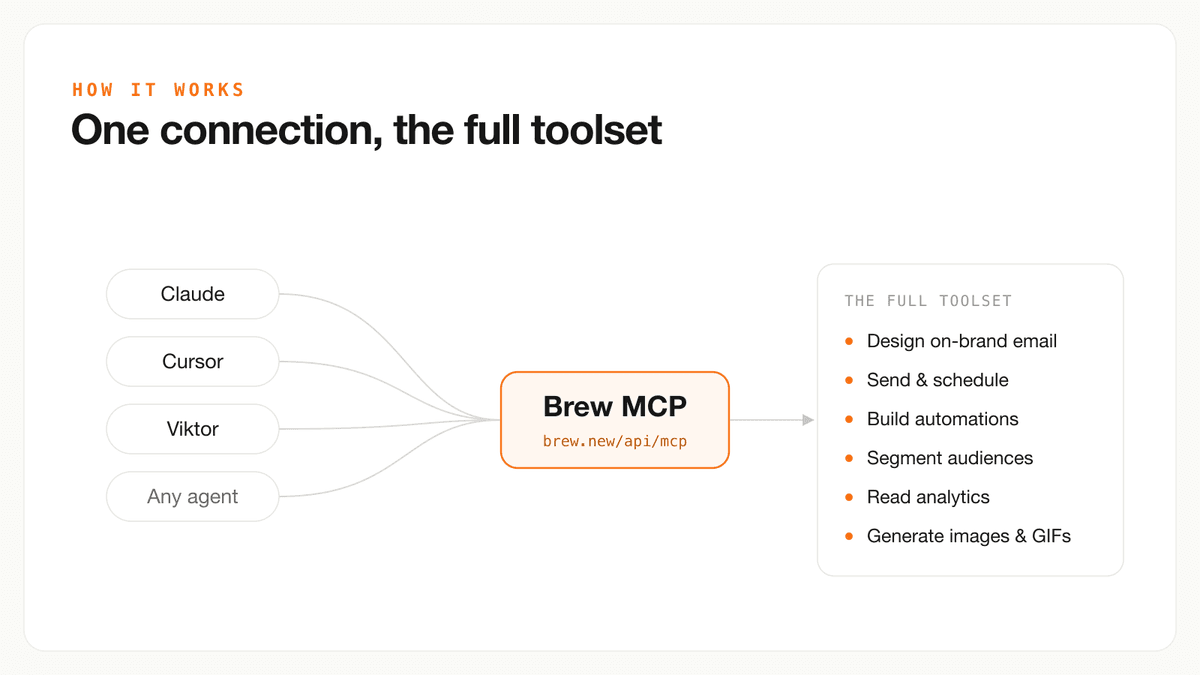
https://brew.new/api/mcp. OAuth, or a brand-scoped API key from Settings, then API.Brew now speaks MCP, the Model Context Protocol. In plain terms, that means your AI assistant can do real work in Brew instead of just talking about it. Connect it once and you can ask your assistant to write a campaign, send it to the right people, set up an automation, or pull last week's numbers. It's the same brand, the same lists, and the same emails you'd build in the app. You just don't have to be the one clicking around to make it happen.
This isn't a chatbot handing you advice. It's your assistant doing the job. Once Brew is connected, you can ask it to:
It all stays on-brand because it's running on the same Brew that already learned your colors, fonts, and voice. An email your assistant sends looks exactly like one you'd build by hand, and it still goes out through your verified domain and lands in the same reports you already check.
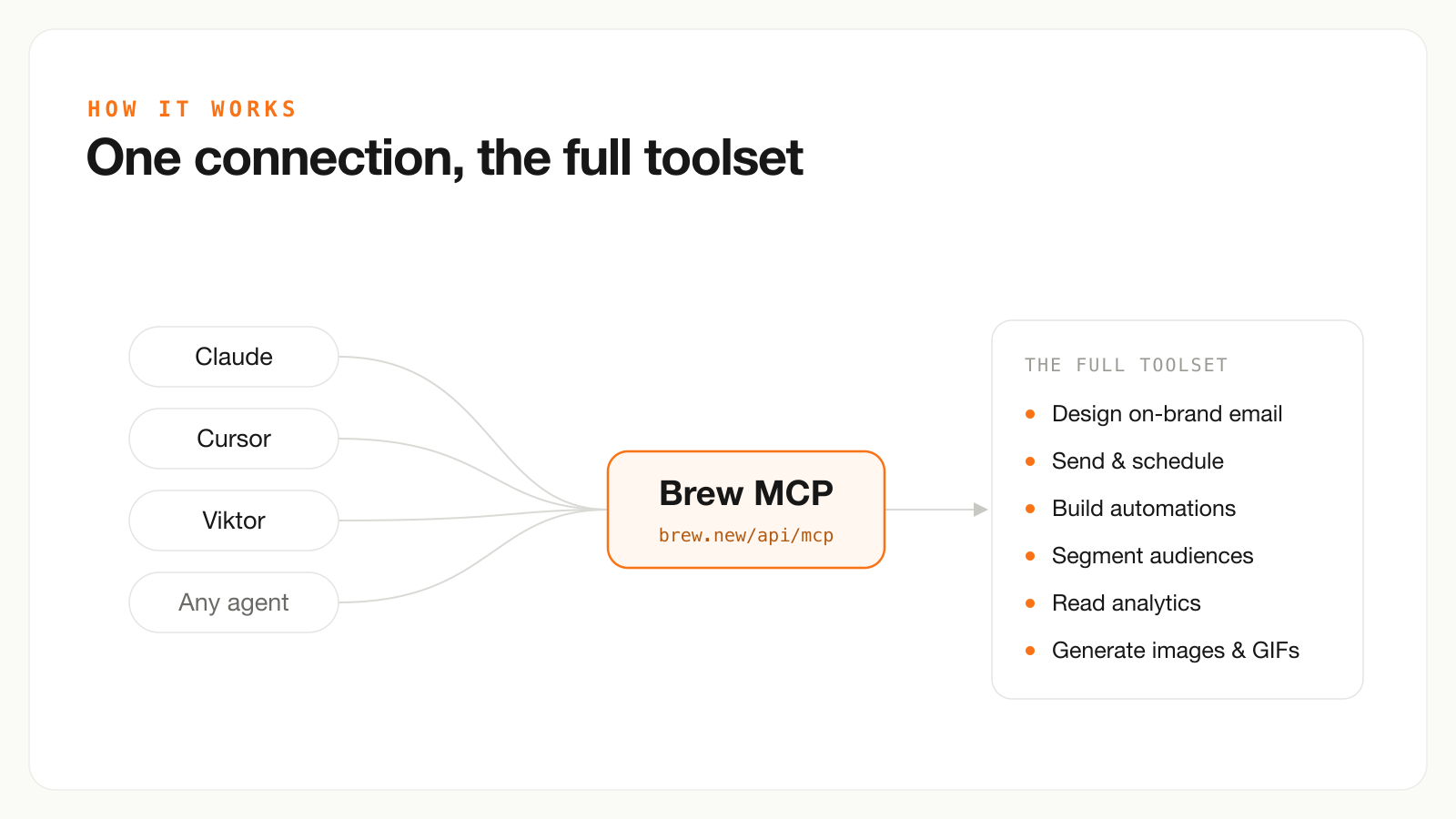
One connection, and your assistant gets the whole Brew toolkit.
In ChatGPT, first enable Developer mode under Settings → Security and login. Then open Settings → Plugins, select +, and create Brew with server URL https://brew.new/api/mcp and OAuth authentication. Sign in to Brew, select a brand, approve the disclosed full-brand access, start a new chat, enable @Brew, and call get_brew_capabilities.
If an older ChatGPT app version reports an invalid schema, refresh its actions. Remove and re-add Brew only after the corrected endpoint is deployed and only if refresh does not work. In Claude, Grok, Cursor, Codex, or another assistant that supports MCP OAuth, add the same server URL, sign in with Brew, select a brand, and call get_brew_capabilities to verify the connection.
If your assistant doesn't support OAuth connectors yet, drop the same URL into its config and authenticate with a brand-scoped API key from Settings, then API instead:
{
  "mcpServers": {
    "brew": {
      "url": "https://brew.new/api/mcp",
      "headers": { "Authorization": "Bearer brew_YOUR_API_KEY" }
    }
  }
}
Either way, it works with ChatGPT, Claude, Grok, Cursor, Codex, and other clients that support remote Streamable HTTP MCP servers.
The most common thing we see is people running campaigns in conversation. You type something like "write a launch email for the new feature, match our brand, and schedule it for Tuesday at 9am to everyone on a trial." Your assistant drafts it in Brew, shows you a preview, and schedules the send. You never leave the chat.
The next step is letting it run on its own. Some teams hand the keys to an AI "employee" like Viktor, which lives in Slack and does real work, and give it a standing job: watch for new signups, drop them into the welcome series, and post the open rates to the channel every Monday. Brew handles the email, Viktor keeps an eye on things, and the team just reviews what came back.
You're still the one calling the shots on strategy and creative. You're just not stuck doing the repetitive parts anymore.
Brew is good at one thing: being the memory and the muscle behind your email program. It gets a lot more useful when your assistant runs it next to the other tools you already have.
Connect Brew to a CRM or enrichment tool like Clay or Attio, and your assistant can handle the whole loop without you copying anything between tabs. It pulls fresh data on a contact, saves that context to their Brew profile, builds a segment around it, sends a campaign written for that group, then checks how it did and adjusts for next time. That's real personalization, and you didn't have to babysit any of it.
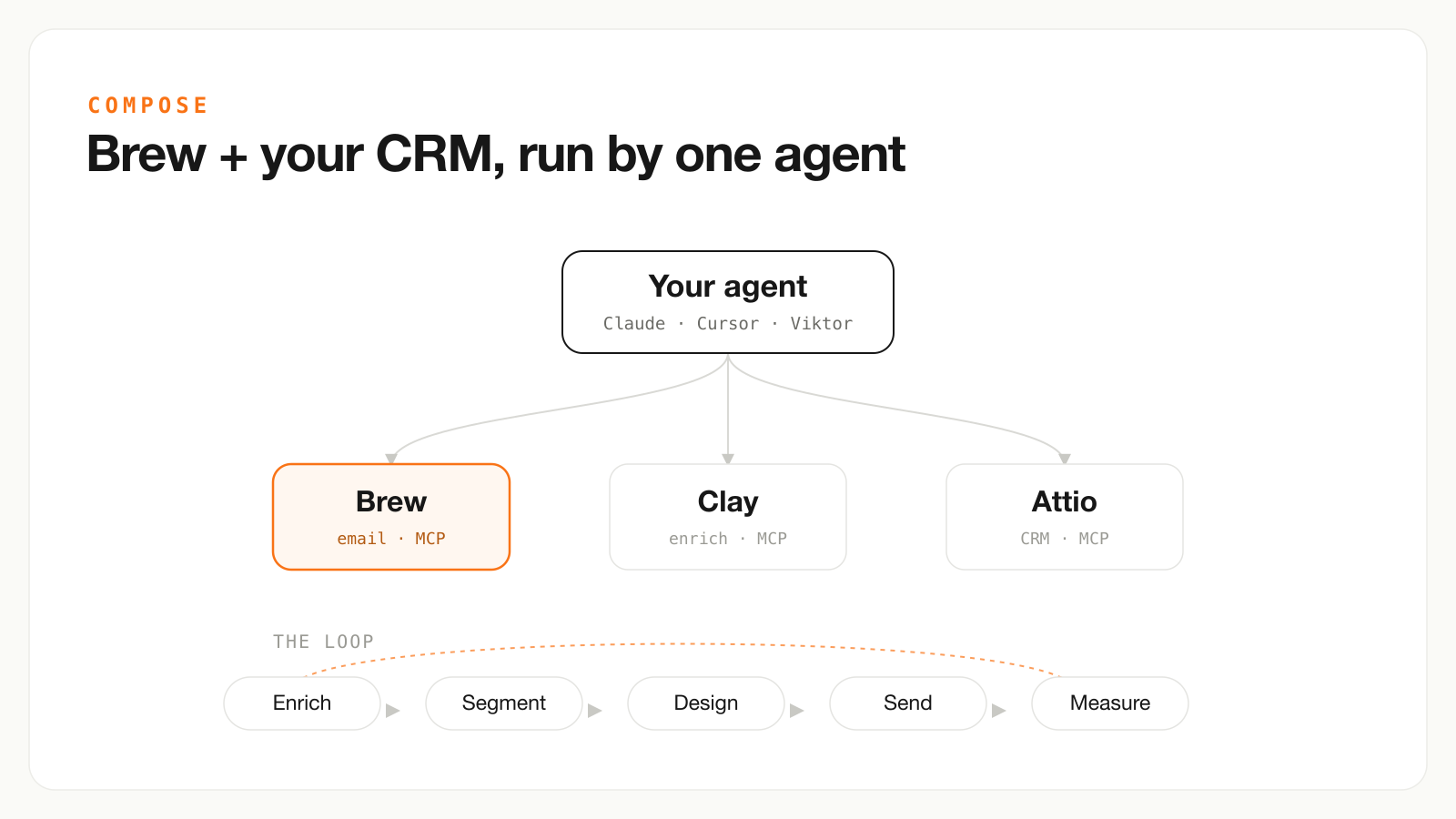
Your assistant runs Brew next to your CRM: enrich, segment, design, send, measure, repeat.
The Brew MCP is live today. Grab a key in Settings, then API, connect it to your assistant, and ask it to send your next campaign. I think you'll be surprised how much of your week it can take off your plate.
Give it a shot and let me know how it goes.
Thomas
The Harmonya loop that uses this connection is in how Harmonya turned a newsletter into a lifecycle program. To contact us about this article, write Brew support.
The Brew MCP is a hosted Model Context Protocol server that lets an assistant drive one brand.
A brand-scoped connection is the rule that the assistant cannot see another customer's list.
A verified sending domain is still required for live campaigns.
For example, Claude can ask Brew to draft a welcome series, then you confirm the from-address before it sends.
| Move | Why it matters |
|---|---|
| Connect one brand | Do not hand an assistant the whole workspace |
| Confirm the send identity | MCP does not create a courtesy inbox lane |
US commercial mail still follows the FTC CAN-SPAM guide and 16 CFR 316.3. Bulk sending still has to meet Gmail's sender requirements. To contact us about this article, use the support link above.
A hosted Model Context Protocol server at https://brew.new/api/mcp. It lets ChatGPT, Claude, Cursor, and other MCP clients run Brew on one brand.
It calls Brew. Sends still go through your verified domain and the same reports you already check. Live campaigns need a domain you own.
Yes. Welcome series, win-back flows, segments, and analytics readback are in the same connection. Confirm the send identity before you let it run unattended.
In ChatGPT, enable Developer mode, add the server URL with OAuth, pick a brand, then call get_brew_capabilities. In Claude, Cursor, or another MCP client, use the same URL. Docs live at docs.brew.new.