
Apple Mail, Gmail and Yahoo now summarize email before people read it. Where to put the offer, deadline and action, Gmail deal markup, and what to avoid.

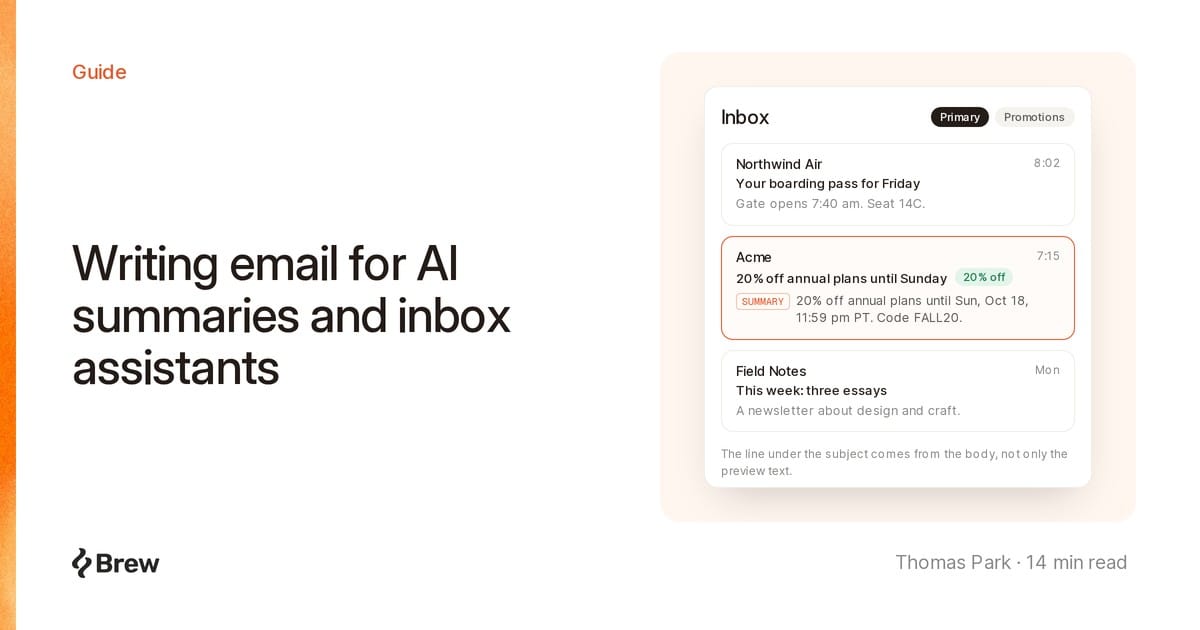
Writing email for AI readers means building a marketing email so the assistants inside inboxes can find its key facts and repeat them correctly. Apple Intelligence, Gemini in Gmail and Yahoo Mail now read a lot of email before the person does. On an iPhone with Apple Intelligence, a short summary sits under each email, right where your preview text used to be.
No vendor publishes how its model picks what goes into a summary, and we won't pretend to know. What they do publish is enough to act on, and most of it is old advice with higher stakes: offer, deadline and action in plain text near the top, and every part of the email saying the same thing.
DiscountOffer annotation in JSON-LD can give a Gmail Promotions email a deal badge (four words max), a code, and a second shot at the top of a bundle within three days of expiry.| Client | Feature | What it does | Who has it |
|---|---|---|---|
| Apple Mail | Inbox summaries | Short summary under each email in the list | Apple Intelligence devices, supported languages |
| Apple Mail | Priority messages | Time-sensitive mail moves to the top of the inbox | Same, in Primary or List View |
| Gmail | AI Overview thread summaries | Summary card at the top of a thread, suggested reminders for tasks with due dates | All Gmail users, supported languages |
| Gmail | AI Overviews in search | Answers a natural-language search from your emails | Paid plans, Gmail set to English |
| Gmail | AI Inbox (beta) | Suggested to-dos and topics, Primary tab only | US, English, eligible Google AI plans |
| Yahoo Mail | Message summaries | A rundown of the important info in a message | Yahoo Mail app and New Yahoo Mail |
Apple's iPhone guide is blunt: "A short summary automatically appears under each email in your inbox." Litmus spelled out the consequence in its preview text guide: "Rather than previewing the first few lines of each email, users can now see AI-generated summaries directly in their inbox."
Apple's categories page has a line marketers should read twice: "When a Transactions, Updates, or Promotions message includes time-sensitive information, it will also be included in the Primary message list." Priority messages then lifts time-sensitive mail to the top. Apple's example of urgent email is "a same-day dinner invitation or boarding pass", not a sale, and it doesn't say how it decides.
iOS 27 shipped on September 14, 2026, and Apple's announcement says Siri AI "can understand personal context across messages, emails, photos, and more." The release notes add Suggestions in Mail, which "help you take action based on the context of your emails, like getting directions to a restaurant you booked." Summaries and Priority messages stay on the feature list. More of what an iPhone user sees about your email now comes from Apple's models.
Thread summaries. Google's January 2026 announcement said AI Overview conversation summaries were "rolling out today for everyone at no cost", starting in the U.S. The help page now says they're "available to all Gmail users globally" and can "Suggest reminders for tasks with a due date." Automatic cards appear where "a summary is helpful, such as longer email threads", so a single promo may not get one, but anyone can tap "Summarize this email".
AI Overviews in search. On September 15, 2026 Google expanded them "to global users (with paid plans) who have their Gmail language set as English." Personal accounts in the EEA, UK, Switzerland and Japan are excluded. The help page explains it: "Gmail first finds the most relevant emails. An AI Overview is then generated using the information from those emails." If a subscriber searches "when does the Acme sale end", the answer is whatever your emails say.
AI Inbox. This US, English-only beta "Only surfaces information from messages in your 'Primary' tab," per its help page, so most marketing email won't appear.
Summary cards and Promotions. Gmail's summary cards "provide important information from your email" for orders, events, travel, bills and promotions. Tape this line to your monitor: if a card "has limited information, there may not be enough details in the email." In September 2025 Google announced a "most relevant" Promotions sort and "nudges" to "highlight upcoming deals and timely offers". Annotations, covered below, are the structured way in.
Yahoo's iOS help page says its AI summaries show "the important info, such as dates and times of events, travel confirmation details, billing details, verification codes and more." Desktop users can turn them off. In March 2026 Yahoo launched Planner for US app users, which pulls things like "an appointment, bill payment deadline" out of email into a calendar and to-do list.
Look at the vendors' examples: a boarding pass, a dinner invitation, a plumber's quote, a bill, a verification code. These features are built for the reader's life admin, and anyone claiming to know how Gmail or Apple weighs sentences in a promo is guessing.
The docs do agree on the basics. The features read message content and pull out concrete facts like dates, codes and amounts, and Google admits a card has less to say when those are missing. So if the offer and deadline are clear text, a summary can repeat them. If they sit in an image or across three paragraphs, it may drop them. If subject, preview and body disagree, it may repeat any of them.
This is the inverted pyramid good copy always used. The difference is that the skimmer is now often a model, and what it writes is what your subscriber sees.
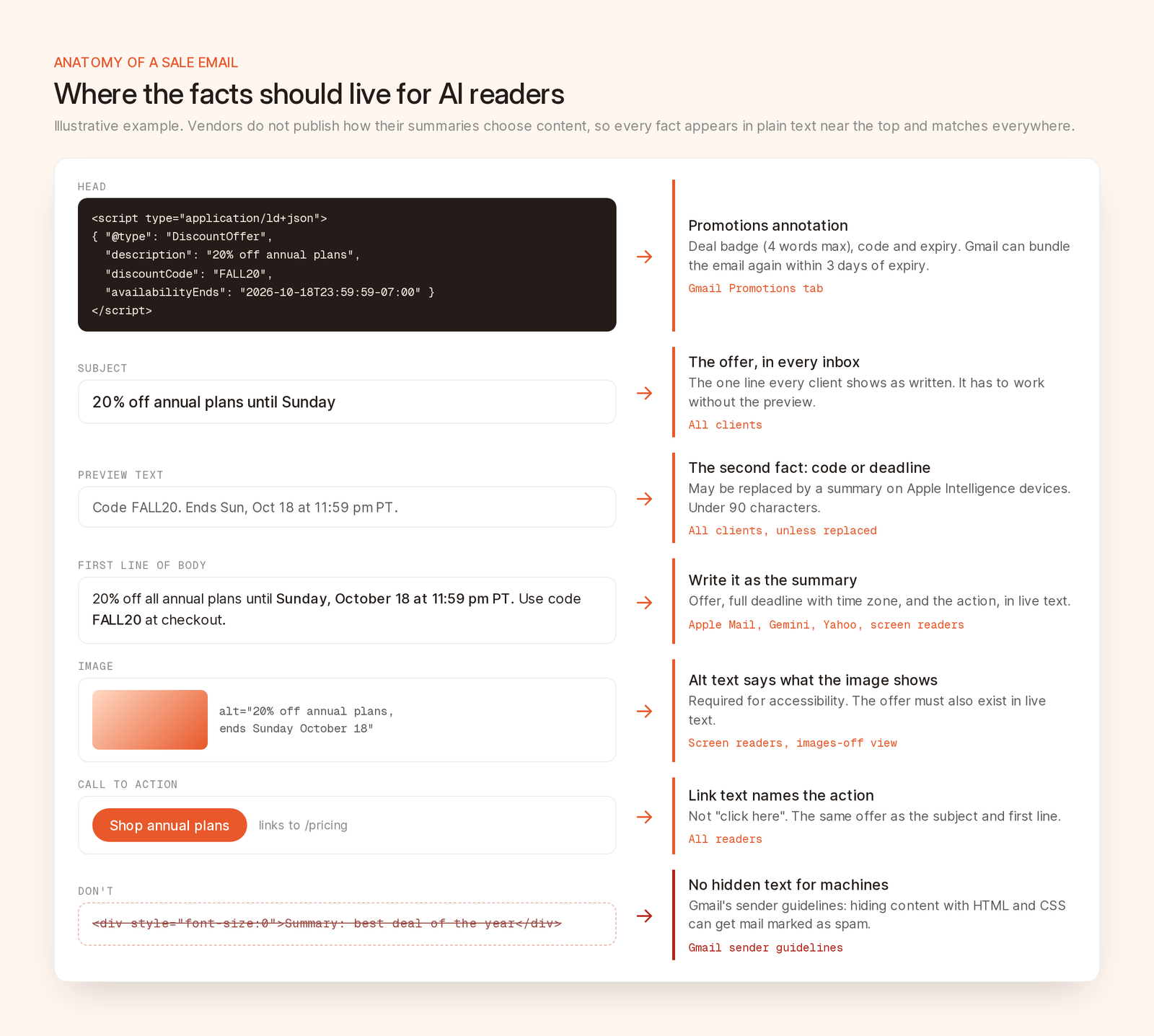
One example email laid out so a summary, a search answer and a Gmail deal annotation all find the same facts.
The subject is the one line you control in every inbox, and on an iPhone it may have to work without the preview. Put the offer in it, as Litmus says: "prioritize getting your main message or hook across in your subject line." Use the preview for the next fact, usually the deadline or code, and keep it under 90 characters (Litmus's number). Our subject line guide covers wording and testing.
Write the first sentence of the body as if it were the summary. Name the offer, the deadline and what to do:
20% off all annual plans until Sunday, October 18 at 11:59 pm PT. Use code FALL20 at checkout.
That sentence works for a skimming human, Apple's summary, a Gmail search answer and a screen reader. Push "View in browser" links, logo-only headers and long greetings below it, or cut them. They come first in the HTML and give a summary nothing.
"Ends Sunday" means nothing in a summary read on Monday, or in a search answer three weeks later. Write "Sunday, October 18 at 11:59 pm PT" and "20% off annual plans", not "huge savings". Gmail's reminders and Yahoo's Planner both need a date written out.
One big image with a line of text under it gives a summary almost nothing to read. If the offer and deadline are baked into the hero, repeat them in live text.
Give images that carry meaning alt text that says what they show, alt="20% off annual plans, ends Sunday October 18" rather than alt="hero", and mark decorative ones alt="". WCAG 2.2 requires text alternatives for non-text content. No vendor says its summaries read alt text, so don't count on it.
Say the subject reads "Last chance: 20% off", the preview says "Ends tonight", and a paragraph lower down says the sale runs to Sunday. A person reconciles that. A summary may pick one. Check that discount, deadline and code match everywhere, in every segment version.
Search makes this stricter. Gmail answers from several emails, so if Friday's email extends Tuesday's sale, write "extended to Monday, October 19" in full. And make buttons say what they do: "Shop annual plans" gives a summary an action to repeat, "Click here" doesn't.
Google's email annotations guide documents structured data for the Promotions tab. A JSON-LD <script> in the <head> can get you a deal badge next to the subject, a deal card, an image preview or a carousel of up to 10 images. The FAQ says annotations are free, have "no effect on the Gmail tab classifier", and display only in the Promotions tab.
A deal annotation for the example above:
<head>
  <script type="application/ld+json">
  [{
    "@context": "http://schema.org/",
    "@type": "DiscountOffer",
    "description": "20% off annual plans",
    "discountCode": "FALL20",
    "availabilityStarts": "2026-10-13T00:00:00-07:00",
    "availabilityEnds": "2026-10-18T23:59:59-07:00",
    "offerPageUrl": "https://example.com/pricing"
  }]
  </script>
</head>
A deal annotation needs at least one of description, discountCode or availabilityEnds. A deal card needs a description plus offerPageUrl or merchantHomepageUrl, and Gmail prefers the offer page. From Google's best practices:
| Field | Google's guidance |
|---|---|
Deal badge (description) |
Specific, like "20% off". No more than four words, since it competes with the subject |
discountCode |
Only if the code appears in the email. Gmail always shows "Code" before it |
availabilityEnds |
Include time and time zone. The email gets two chances at the top of a bundle: at send, and within three days of expiry |
| Expired dates | Don't leave one in. Gmail treats it as an old offer and won't bundle the email |
| Images | No text-only images. HTTPS URLs. 4:5, 1:1 or 1.91:1, center-cropped |
Two caveats. "Quality filters and frequency limits" decide whether annotations show, and Gmail bundles emails without them based on "previous user engagement". Annotations add structure, not rank. And keep them matching the body: JSON-LD saying FALL20 over a body saying FALL25 is the consistency problem again, now in code.
The worst idea going around is a hidden second email for the AI: white on white, font-size:0, "Summary: the best deal of the year." Don't.
Gmail's email sender guidelines are explicit: "Don't use HTML and CSS to hide content in your messages. Hiding content might cause messages to be marked as spam." Google's web spam policies are for websites, but they show the thinking: "Setting the font size or opacity to 0" is hidden text abuse, and "attempting to manipulate generative AI responses in Google Search" is spam.
Google has a reason to be strict. In July 2025, 0DIN published a prompt-injection proof of concept against Gemini's "Summarize this email": instructions hidden with font-size:0 or white text made the summary append a fake password warning. Google's June 2025 security post describes classifiers that detect "malicious prompts and instructions within various formats, such as emails". Your "helpful" hidden summary looks the same to them.
One honest note: nearly every platform, Brew included, sets preview text with a hidden element, because email has no header for it. Google doesn't carve that out. We read the rule as aimed at content that differs from what readers see, so keep the preview short and consistent with the visible email.
alt="" on decorative ones.DiscountOffer badge is four words or fewer, with a future end date and time zone.display:none, font-size:0 and opacity:0 finds only the preview text.More on copy in writing marketing emails people can act on. And none of it matters if you don't reach the inbox first.
Brew handles several of these checks for you. Its agent writes preview text as one short line that adds to the subject instead of repeating it, and you can edit it in the send dialog's Preview field. On delivery Brew pads the preview with invisible characters, as React Email does, so body copy doesn't spill into the preview line.
Brew's email audit checks "subject and preview length, clarity, duplication, and placeholders" and "alt text, contrast, document language, headings, and link text." The parts that matter here:
alt attribute, plus an AI review of whether alt text describes the image (a file name fails)A full audit costs 5 credits and also runs from MCP (audit_email), the CLI and the API. Gmail annotations are outside its scope: Brew doesn't generate DiscountOffer markup, and the audit flags any <script> as markup inboxes commonly remove, so add annotations in your own HTML if you rely on them. Step 6, matching deadlines across the email, stays a human read.
On Apple Intelligence devices, "a short summary automatically appears under each email in your inbox," where preview text used to show. The subject still shows, so make it carry the offer, and put offer and deadline in the body's first lines.
Not directly. Google doesn't publish how summaries are built, and no markup sets one. You control the content, so state the offer, deadline and action clearly and consistently.
No. Google's FAQ says annotations have "no effect on the Gmail tab classifier" and only display in the Promotions tab, subject to quality filters and frequency limits.
Gmail's guidelines say not to hide content with HTML and CSS and don't mention preheaders, which are standard practice. Keep yours short and consistent with the visible email, and hide nothing else.
We haven't found reliable published data, and vendors don't report it. Watch clicks and conversions from Apple Mail and Gmail users, and treat a summary that repeats your offer correctly as the win.
Yes, as long as it's visible. A first line with offer, deadline and action helps every reader. The hidden version is the one that gets you in trouble.