
Raise holiday email volume by engagement tier, cap frequency, sunset dead contacts in October and stay under Gmail's 0.1% spam rate through Cyber Monday.

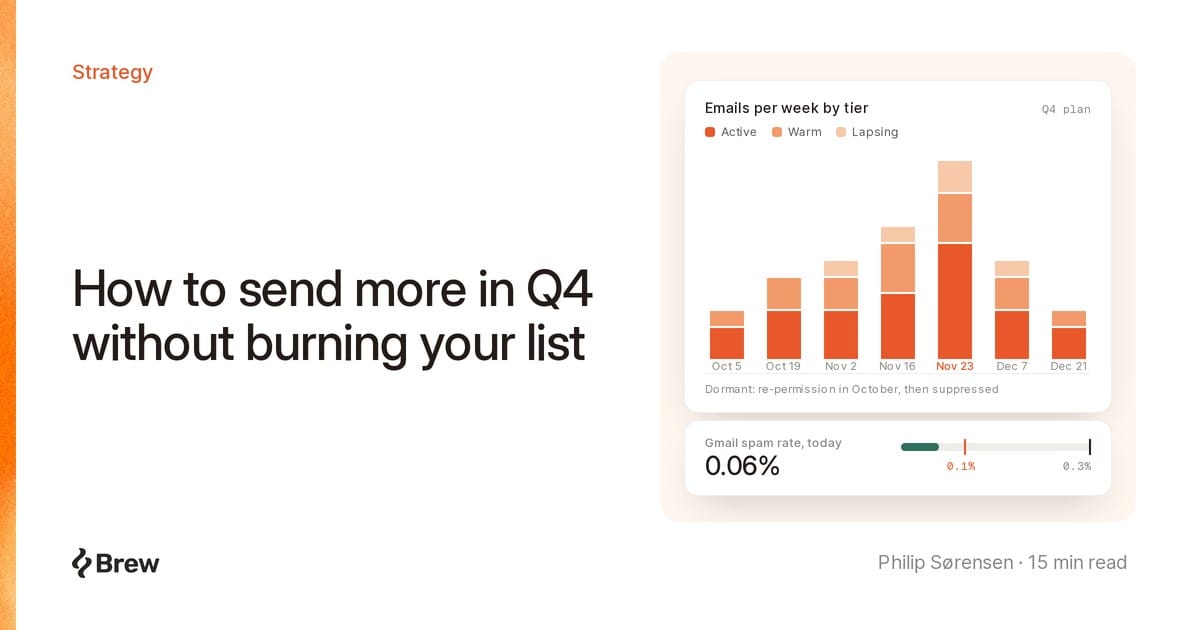
A Q4 frequency plan decides how much more email you send between October and December, who gets the extra volume, and in what order. Send more, just not to the half of the list that has not clicked since spring.
A list fine with two emails a week in September can spike complaints in Black Friday week (November 27 this year). Our plan: tier by real engagement, add volume to the best tier first, widen to colder tiers in slices, cap frequency per person, and clean the list in October.
Google's email sender guidelines tell bulk senders to "start with a low sending volume to engaged users, and slowly increase the volume over time," and warn that "immediately doubling previously sent volumes suddenly could result in rate limiting or reputation drops." Excess volume typically draws 4.7.28 errors. Google says pause at least 10 minutes, then resume on one connection.
Yahoo's sender best practices agree: "Honor the frequency of the list's intent. Don't start sending daily emails to subscribers of your weekly or monthly mailing." The M3AAWG Senders Best Common Practices (February 2015, still widely quoted) notes that "unexpected increases in the frequency of messages often leads to increased abuse complaints."
Send a weekly subscriber eight emails in nine days and most ignore it. A few click "Report spam," and a few is enough.
| Rule | Gmail | Yahoo | Outlook.com |
|---|---|---|---|
| Applies to | Over 5,000 messages a day to Gmail accounts | "Bulk" senders, no number published | Domains sending over 5,000 emails a day |
| Spam complaint rate | Below 0.1%, never reach 0.3% | Below 0.3% | No number published |
| One-click unsubscribe | Required for marketing mail, RFC 8058 headers | Required for marketing mail, RFC 8058 POST "highly recommended," mailto: accepted |
"Functional unsubscribe links" recommended |
| Honor unsubscribes | Within 48 hours | Within 2 days | Not specified |
| Authentication | SPF, DKIM and DMARC (p=none minimum) |
SPF, DKIM and DMARC | SPF, DKIM and DMARC, rejected with 550 5.7.515 if missing |
Sources: Google's guidelines and sender FAQ, Yahoo's best practices and FAQ, and Microsoft's April 2025 announcement.
Spam rate "is calculated daily," per Google's FAQ, so one bad send sinks the day. From November 2025, Gmail is "ramping up its enforcement on non-compliant traffic," including temporary and permanent rejections.
One complaint per 1,000 delivered. Land 200,000 Gmail inboxes on Black Friday and you can absorb about 200. At 600 you hit 0.3%.
Google's Postmaster Tools documentation counts messages "delivered to engaged recipient's Inbox and then marked as spam," and warns that if much of your mail already goes to spam, "the rate shown in the dashboard might seem low, because recipients get fewer of your messages in their Inbox." A low rate in a bad week can mean you are already in spam.
Opens broke with iOS 15 in 2021: Apple's Mail Privacy Protection page says "Protect Mail Activity downloads remote content in the background by default, regardless of whether you engage with the email," and its iPhone guide says it "prevents senders from seeing if you've opened the email message they sent you." An open-based "engaged" segment fills with people who never read you. More in why opens are a weak metric.
Tier on the most recent signal a person had to produce:
| Tier | Definition | Q4 role |
|---|---|---|
| New | Subscribed in the last 30 days | Welcome flow, then the Active cadence |
| Active | Clicked, bought or visited in the last 30 days | Most of the extra volume |
| Warm | Last activity 31 to 90 days ago | Moderate increase, the main growth tier |
| Lapsing | Last activity 91 to 180 days ago | Added in slices from early November |
| Dormant | No activity in 180 days, or never | Re-permission in October, then suppressed |
Infrequent senders need longer windows. Klaviyo's engaged segment guide suggests "a long time period (e.g., 60 days rather than 30 days)" in that case. Match windows to your purchase cycle and hold them fixed all quarter (segmentation guide).
Counts are marketing emails per person per week.
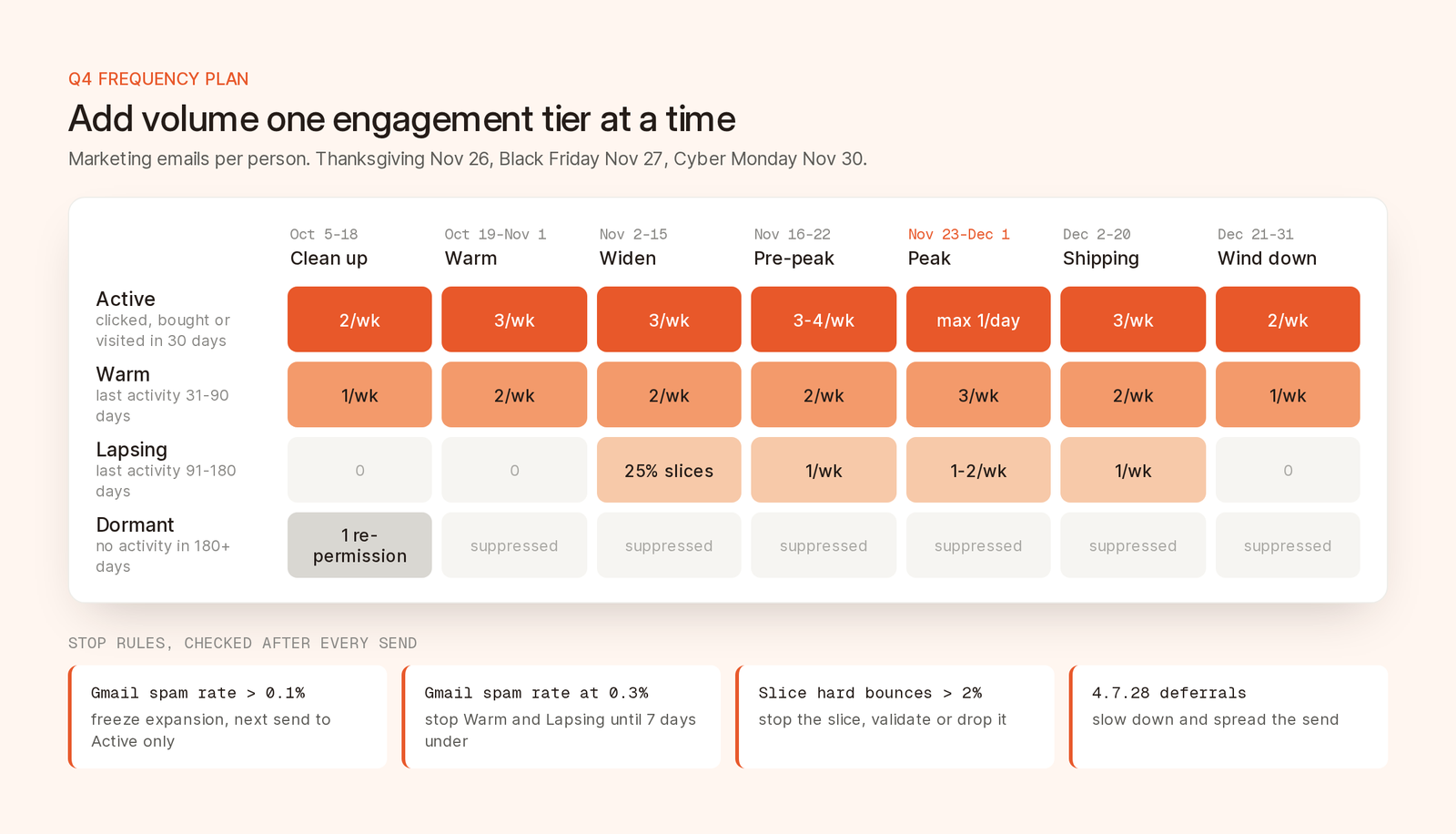
A sample Q4 ramp. A tier gets more only after the one above holds for a week.
The order matters more than the counts:
Decide now. Nobody decides well at 11pm on Black Friday.
| Signal | What to do |
|---|---|
| Gmail spam rate above 0.1% on any day | Freeze expansion. Next send goes to Active only. |
| Gmail spam rate at or above 0.3% | Stop Warm and Lapsing until the rate stays under 0.3% for 7 days. |
| A Lapsing slice hard-bounces above 2% | Stop the slice. Validate or drop those old addresses. |
4.7.28 deferrals from Gmail |
Spread the send over more hours and cut volume until errors fall. |
| Unsubscribe rate doubles your baseline | Drop that tier by one email a week. |
The 2% bounce line is ours. Google and Yahoo do not publish one.
Cart, browse, back-in-stock, post-purchase and welcome automations can turn a sane calendar into nine emails a week. Cap the total per person:
At the cap, drop the promotion, keep the triggered email. Without a native cap, skip anyone who got a campaign in the last 24 hours.
Year-round, suppress hard bounces, complainers, repeat soft bounces, and unsubscribes within the 48 hours Google recommends and the 2 days Yahoo requires. US law allows 10 business days, but the providers expect faster.
Dormant is where spam traps live. Spamhaus describes "dead" address traps as once-valid addresses that hard-bounced "for a period of time, often 12 months or more," before being revived as traps. M3AAWG's spam trap guide calls them recycled traps and suggests operators wait 12 months or more before converting.
The sunset policy:
Yahoo recommends "sending a reconfirmation email to inactive subscribers periodically." Our win-back guide covers defining inactivity.
Overloaded subscribers pick unsubscribe or report spam. A "fewer emails" option keeps some. The CAN-SPAM Act (15 U.S.C. 7704) allows "a list or menu from which the recipient may choose the specific types of commercial electronic mail messages the recipient wants to receive or does not want to receive," as long as it "includes an option under which the recipient may choose not to receive any commercial electronic mail messages from the sender." Try a 30-day pause, newsletter-only, or a weekly digest.
Opt-down never replaces the header. Google's FAQ says one-click removes the recipient "only from the mailing list associated with the message," and a body link may go to a preferences page, but that link "alone, without one-click unsubscribe email headers, doesn't meet the one-click unsubscribe requirement."
List-Unsubscribe: <https://example.com/unsubscribe/opaque-token>
List-Unsubscribe-Post: List-Unsubscribe=One-Click
RFC 8058 requires an HTTPS URI in List-Unsubscribe, the exact value List-Unsubscribe=One-Click in List-Unsubscribe-Post, a DKIM signature covering both, and no HTTPS redirect. The POST carries no cookies or authorization, so the URL must identify the recipient and list.
Tiers. Saved audiences filter on contact properties, subscription status, and whether a contact ever opened, clicked or was sent an email. For 30 and 90 day tiers, build an event snapshot: ask Brew's agent in chat, or call create_audience_from_events over MCP or POST /v1/audiences/from-events. Snapshots exclude machine clicks by default and cover up to 90 days, so a 180-day tier takes two: build days 1 to 90 and 91 to 180, then one saved audience that ORs their filters (shown by GET /v1/audiences/{id}), so nobody gets the email twice. They freeze when built, so rebuild before big sends. The exclude option returns everyone in a base audience who did not match, so "no clicks in 90 days" is one call. See the Create Audiences docs.
Purchases and site activity. Sync them onto contacts as properties via an integration such as Shopify or Stripe, or the API, then filter dates with before and after.
Slices and ramps. Gradual send splits one send into percentage batches, hourly or daily, each growing by your increment, up to 30 batches and 50,000 recipients. Pause between batches if a slice looks bad.
Suppression. Brew suppresses hard bounces and spam complaints immediately, and repeated soft bounces after a threshold. Imports, the API and MCP never re-subscribe anyone. Every marketing and automation send carries the RFC 8058 headers.
Monitoring. Brew Insights flags a campaign or automation step when its complaint rate is proven above 0.1%. The unsubscribe page's Activity tab shows the 30-day unsubscribe rate and reasons, including the default "Too many emails."
Opt-down and caps. Contacts are subscribed or unsubscribed, and caps and preference pages are yours to build. Host a form, write the choice to a custom field such as email_frequency or paused_until through the contacts API, and filter on it in each send's audience. For a cap, exclude anyone in an event snapshot of sent over the last day.
Up to one a day to contacts who clicked or bought in the last 30 days, about three to those active in 90, one or two to anyone older. Your real limit is a daily Gmail spam rate under 0.1%.
Google says stay below 0.1% and never reach 0.3%. Yahoo says below 0.3%. Above that, Google says you are ineligible for delivery mitigation until you stay under it for 7 consecutive days.
Add contacts inactive for 91 to 180 days in slices from early November. Anyone inactive longer gets one re-permission email in October and is suppressed if they do not respond.
No. Apple Mail Privacy Protection downloads remote content, including tracking pixels, whether or not the person reads the email. Use bot-filtered clicks, purchases, logins and site visits instead.
No. Gmail requires the RFC 8058 List-Unsubscribe and List-Unsubscribe-Post headers on marketing email, and Yahoo requires a working one-click List-Unsubscribe header and highly recommends RFC 8058. A preferences or opt-down link in the body only counts in addition to the headers.